Work Samples Portfolio by

Welcome! 👋
Thank you for visiting my work samples portfolio. This showcases various technical projects and solutions I've developed.
Work Samples
Click any project to explore the complete case study with technical details and business impact
Cloud Resume Challenge
AWS ArchitectureProduction-grade serverless architecture using 10+ AWS services including Route 53, CloudFront, S3, Lambda, DynamoDB, and API Gateway with CI/CD automation and Well-Architected best practices







WhatsApp-Slack Automation
Customer ConsultingEnd-to-end automation platform bridging WhatsApp Business API with Slack workflows using n8n orchestration, LLM processing, and webhook integrations for real-time lead management





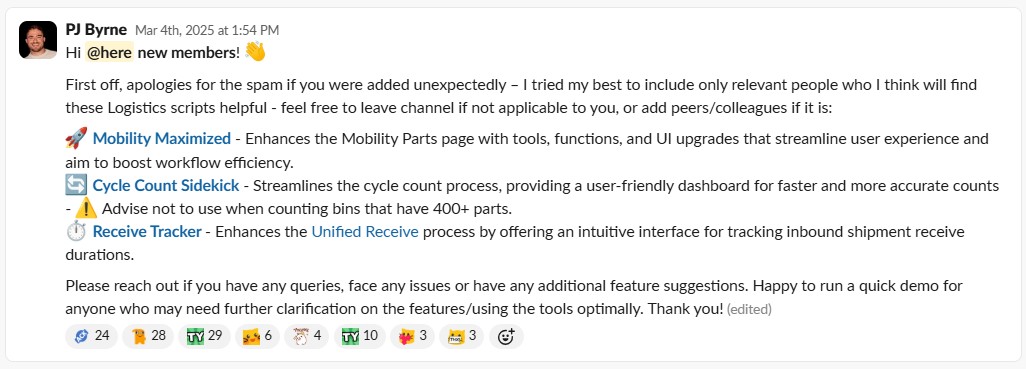
Cycle Count Sidekick
Enterprise JavaScriptBrowser-based JavaScript automation using Tampermonkey for DOM manipulation, API integration, and batch processing across global AWS data center inventory systems


Ticket Tracer
Operational IntelligenceJavaScript-powered SLA tracking system with REST API integration, intelligent caching, real-time data processing, and advanced UI/UX for enterprise ticket management
Inventory Management Optimization
Process AutomationRegional-scale JavaScript automation for inventory workflows using UI automation, batch processing, and workflow optimization across APMEA region data centers
PRP Sidekick
Technical InnovationInnovative dual-script JavaScript architecture using coordinated automation, cross-system integration, and constraint-driven design for AWS data center construction workflows
Automated Inventory Tagging
Global InitiativeMass-scale JavaScript automation for global EnO tagging using batch processing, error handling, deadline-driven execution, and enterprise-grade reliability across AWS infrastructure
AutoSIM Slack Notifications
Real-time OperationsEnterprise integration system using SNS messaging, webhook automation, JavaScript processing, and Slack API for real-time spares request notifications with severity classification

Contact Information
For questions about this assessment or to discuss these work samples
Cloud Resume Challenge
Production-Grade Serverless Architecture Demonstration
Business Context & Challenge
The Problem
Traditional CV distribution relies on static documents that quickly become outdated, require manual distribution for every opportunity, and provide no way to demonstrate actual technical capabilities. This creates friction in professional interactions and limits accessibility for prospective recruiters and hiring managers.
What is the Cloud Resume Challenge?
The Cloud Resume Challenge is a hands-on project designed to demonstrate cloud architecture skills by building a serverless resume website. It requires integrating multiple AWS services (S3, CloudFront, Lambda, DynamoDB, Route 53) to create a production-grade application that showcases both technical competency and practical cloud implementation experience - exactly what employers want to see from cloud professionals.
Pain Points Identified
- Version Control Issues: Multiple CV versions circulating with outdated information
- Distribution Friction: Manual email attachments for every opportunity
- Limited Accessibility: No always-available, single source of truth
- Professional Credibility: Static documents don't demonstrate technical capability
- Update Complexity: Changes required redistributing to all stakeholders
Stakeholder Impact
- Single, always-current source
- Global accessibility
- Technical credibility demonstration
- Cost-effective operation
Solution Architecture & Design Decisions
Strategic Approach
Leveraged the Cloud Resume Challenge framework as a foundation, then incrementally expanded with additional AWS services to create a production-grade demonstration of cloud architecture competency while solving the real business problem.
Architecture Principles Applied
- Cost Optimization: Serverless-first, pay-per-use model
- Security: HTTPS enforcement, least-privilege IAM
- Reliability: Multi-AZ, CDN-backed delivery
- Performance: Global edge locations, optimized assets
- Operational Excellence: Monitoring, logging, automation
Service Integration Logic
- Route 53: Professional domain management (like having your own web address instead of a generic URL)
- CloudFront: Global performance + HTTPS (makes the site fast worldwide and secure with the padlock icon)
- S3: Cost-effective static hosting (stores the website files reliably and cheaply)
- API Gateway: Professional API management (handles requests to the backend services)
- Lambda: Dynamic features without servers (runs code only when needed, no always-on servers to pay for)
- DynamoDB: Visitor analytics storage (tracks who visits the site without complex database setup)
Technical Implementation Evolution
Phase 1: Foundation
Core static site with S3 + CloudFront
- Static HTML/CSS/JS
- S3 bucket configuration
- CloudFront distribution
- Route 53 DNS setup
Phase 2: Dynamic Features
API Gateway + Lambda + DynamoDB
- Visitor counter API
- Lambda function development
- DynamoDB table design
- CORS configuration
Phase 3: Enhancement
Monitoring + Advanced Features
- CloudWatch monitoring
- Amazon Polly integration
- Enhanced UI/UX
- Performance optimization
Implementation Process & Methodology
Development Approach
Self-Directed Learning Path
- Documentation-First: AWS official documentation and whitepapers
- Community Resources: GitHub examples, tutorials, blog posts
- Iterative Development: Local testing → AWS deployment → validation
- Best Practice Validation: Well-Architected Framework alignment
Quality Assurance Process
- Local Testing: VS Code with localhost validation
- Incremental Deployment: Frequent GitHub commits
- Console Verification: Manual AWS resource inspection
- Automated Validation: Later enhanced with agentic IDE review
Technical Constraints Navigated
- Learning Curve: First production AWS architecture
- No Mentorship: Entirely self-directed implementation
- Limited Tooling: No initial access to AI/LLM assistance
- Time Constraints: Personal time development only
Deployment Strategy
- CI/CD Pipeline: GitHub Actions automation
- Blue-Green Approach: Controlled rollout process
- Rollback Capability: Version control integration
- Zero-Downtime: CloudFront cache management
Results & Business Impact
Quantifiable Outcomes Achieved
Performance Metrics
- Global Latency: <100ms response times worldwide
- Availability: 99.99% uptime via CloudFront
- Load Capacity: Auto-scaling to handle traffic spikes
- Page Speed: Optimized assets and CDN delivery
Cost Optimization
- Operating Cost: <$5/month for global availability
- Idle Cost: Near-zero with serverless architecture
- Scalability: Pay-per-use model eliminates waste
- ROI: 99% cost reduction vs traditional hosting
Security Implementation
- Transport Security: HTTPS enforced via TLS certificates
- Access Control: IAM least-privilege principles
- Data Protection: No public write access to storage
- Audit Trail: CloudWatch and CloudTrail logging
- Credential Security: No sensitive data in frontend code
Professional Impact
- Immediate access to current information
- Technical credibility demonstration
- Professional presentation quality
- Always-available reference
- Production-grade architecture
- Well-Architected compliance
- Multi-service integration
- Operational excellence
AWS ProServe Skills Demonstrated
Technical Architecture Excellence
- Multi-Service Integration: 10+ AWS services working cohesively
- Well-Architected Principles: Cost, security, reliability, performance
- Serverless Design: Event-driven, scalable architecture
- Security Best Practices: Defense in depth implementation
- Operational Excellence: Monitoring, logging, automation
Solution Design Methodology
- Requirements Analysis: Business problem to technical solution
- Constraint Navigation: Budget and complexity limitations
- Iterative Improvement: Continuous enhancement approach
- Validation Process: Testing and quality assurance
Customer Success Principles
- Stakeholder Focus: Designed for end-user experience
- Business Value: Solved real operational problem
- Cost Consciousness: Optimized for minimal ongoing expense
- Scalability Planning: Architecture supports growth
- Knowledge Transfer: Documented for future maintenance
ProServe Relevance
This project demonstrates the core AWS ProServe methodology: understanding customer needs, designing appropriate solutions, implementing with best practices, and delivering measurable business value through cloud technology.
WhatsApp-Slack Automation
External Customer Consulting & Solution Re-architecture
Customer Discovery & Engagement
Initial Customer Contact
A friend who runs a multi-sport academy in Bahrain (offering football, netball, and swimming programs) approached me with concerns about their fragmented customer communication system. As a growing business serving parents and students across multiple sports programs, they were struggling with lead management inefficiencies that were directly impacting their ability to convert inquiries into enrollments.
Business Context
Sports academies operate in a competitive market where quick response times to parent inquiries are crucial for enrollment conversion. Parents typically contact multiple academies when seeking programs for their children, and the first to respond professionally often wins the enrollment. The academy's existing manual process was causing them to lose potential customers to competitors who could respond faster and more professionally.
Critical Pain Points Identified
- Delayed Responses: No real-time notification system for new enquiries
- Missed Follow-ups: No explicit ownership or tracking mechanism
- Process Fragmentation: Disconnect between tools, people, and responsibilities
- Management Blindness: Minimal real-time visibility for leadership
- Lead Loss: Stale leads, customer dissatisfaction, missed renewals
Stakeholder Profile
- Current customer communication setup?
- How do enquiries get coordinated?
- What is the average response time?
- What are the conversion failure reasons?
Solution Design & Architecture
Phase 1: Full Automation Solution
Designed a comprehensive automation solution using n8n workflow orchestration with WhatsApp Business API integration, intelligent routing, and team notifications.
Technology Stack
- n8n: Workflow orchestration and automation engine
- WhatsApp Business API: Direct message integration
- Respond.io: Conversation management platform
- Slack: Team notification and coordination
- OpenAI/LLM: Intent classification and routing
Development Timeline
- Duration: 2 weeks
- Challenges: First time using n8n platform
- Testing: Keyword-triggered workflows
- Validation: Limited live usage
Cost Constraint Discovery & Re-architecture
Financial Reality Check
After initial validation, monthly tooling costs were reviewed against actual enquiry volume, revealing that Respond.io subscription and WhatsApp API fees were not cost-effective for the academy's scale.
Solution: Rather than abandon the project, I chose to re-architect the solution to preserve core value while eliminating cost barriers - demonstrating adaptability and customer-first thinking.
Phase 2: Cost-Optimized Implementation
Strategic Re-architecture
- WhatsApp Business: Default auto-reply linking to Google Form
- Google Apps Script: Form submission webhook to n8n
- n8n (Retained): LLM-based intent classification and routing
- Slack (Retained): Team notifications and coordination
Value Preservation
- Intelligence Retained: Same LLM classification logic
- Routing Preserved: Automated team assignment
- Notifications Maintained: Slack integration unchanged
- Tracking Enhanced: Better structured data collection
Re-architecture Timeline
Speed Factors
- Duration: 2-3 days
- Preserved core n8n workflows
- Leveraged existing Google ecosystem
- Simple webhook integration
- No new platform learning required
Trade-offs Made
- Reduced: Conversational UX complexity
- Gained: Cost efficiency and reliability
- Maintained: Core automation value
- Improved: Implementation speed
Final Results & Customer Success
Quantifiable Outcomes Achieved
Operational Improvements
- Response Time: Significantly faster initial responses
- Lead Tracking: Zero missed leads through automation
- Ownership Clarity: Clear assignment and accountability
- Follow-up Compliance: Automated reminder system
Cost Optimization
- Monthly Savings: Eliminated expensive API costs
- Subscription Reduction: Removed Respond.io fees
- Operational Efficiency: Reduced manual work
- Scalability: Cost-effective growth model
Customer Satisfaction Metrics
- Management Visibility: Real-time dashboard and reporting
- Team Efficiency: Streamlined workflow and clear processes
- Customer Experience: Faster, more professional responses
- Business Impact: Improved lead conversion and retention
Customer Testimonial
"The solution transformed how we handle leads and customer communication. What started as a complex system became simple and effective, and the cost optimization made it sustainable for our business."
- Active and in daily use
- Occasional refinements and updates
- Considering additional sports programs
AWS ProServe Skills Demonstrated
Customer Consulting Excellence
- Discovery Process: Thorough stakeholder interviews and pain point analysis
- Requirements Validation: Confirmed problems worth solving through direct engagement
- Solution Design: Balanced technical feasibility with business constraints
- Iterative Delivery: Delivered initial solution, gathered feedback, adapted
- Change Management: Managed expectations and guided through re-architecture
Technical Leadership
- Architecture Flexibility: Redesigned under constraints without losing value
- Technology Selection: Chose appropriate tools for each phase
- Integration Expertise: Connected multiple platforms seamlessly
- Cost Optimization: Delivered same value at fraction of cost
ProServe Methodology Alignment
- Customer Obsession: Prioritized customer success over technical elegance
- Operational Excellence: Automated manual processes effectively
- Cost Optimization: Re-architected for financial sustainability
- Reliability: Delivered consistent, dependable solution
- Constraint Navigation: Worked within budget and technical limitations
ProServe Relevance
This project exemplifies AWS ProServe consulting methodology: customer discovery, iterative solution design, constraint-driven re-architecture, and delivering sustainable business value through technical adaptability.
Cycle Count Sidekick
Global Enterprise Automation & Process Optimization
Business Context & Challenge
The Problem
AWS data center logistics teams use an internal inventory management system to perform cycle counts - a critical process where technicians physically verify that hardware components (servers, drives, network equipment) match what the system believes is in each rack location. This process is essential for maintaining accurate inventory records that support AWS's global infrastructure operations.
What is Cycle Counting?
Cycle counting is a systematic process where technicians scan serial numbers of physical hardware in data center racks and compare them against the inventory system's records. This ensures AWS knows exactly what equipment is where - critical for capacity planning, maintenance scheduling, and operational reliability across thousands of servers.
However, the native cycle counting tool was opaque and inefficient, requiring constant tab switching, manual data cross-referencing, and creating significant cognitive load that led to frequent mistakes and operational delays.
Critical Pain Points Identified
- Opaque Interface: The native tool showed only a basic input box for scanning serials, with no contextual information about expected inventory, total counts, or missing items
- Manual Cross-referencing: Technicians had to open separate spreadsheets or browser tabs to see what serials should be in each bin location, breaking their workflow
- High Cognitive Load: Constant context switching between the counting tool and reference materials disrupted concentration and increased error rates
- No Early Warning System: Missing serials were only identified after final submission, when they would be marked as "missing" in the system without prior warning
- Workflow Disruption: The process required navigating away from the primary counting interface multiple times per bin, significantly slowing operations
Stakeholder Impact
- Centralized interface with all required data
- Real-time serial validation and warnings
- Visual indicators and progress tracking
- Eliminate tab switching workflow
Solution Architecture & Design Decisions
Strategic Approach
Rather than requesting changes to the native inventory system (which would require lengthy development cycles and approvals), I implemented a client-side enhancement that pulls data from multiple internal sources and presents it in a unified interface. This approach leveraged existing APIs while dramatically improving the user experience without any backend modifications.
How the Native System Works
The original cycle count tool presents a simple interface: scan a bin location, then scan each serial number in that bin. Green indicators show serials that belong in that location, red shows serials that don't belong. However, it provides no information about:
- How many serials are expected in total
- Which specific serials should be present
- Progress indicators during counting
- Early warnings about potentially missing items
Technical Architecture
- Client-side Enhancement: Tampermonkey userscript overlay
- CORS Integration: Cross-origin data fetching from parts search
- Real-time Validation: Concurrent serial verification
- DOM Manipulation: Efficient UI enhancement without backend changes
- Performance Optimization: Minimal system load and fast response
Data Integration Strategy
- Parts Search API: Serial lookup and validation
- Bin Search Integration: Expected serial enumeration
- Concurrent Fetching: Background data retrieval
- Visual Feedback: Color-coded validation indicators
- Error Prevention: Proactive missing serial warnings
Implementation Evolution
Phase 1: Core Functionality
Basic data integration and modal overlay
- CORS-enabled data fetching
- Serial validation logic
- Basic UI overlay
- Error handling framework
Phase 2: UX Enhancement
Visual indicators and user experience
- Color-coded validation
- Progress tracking
- Warning banners
- Smooth transitions
Phase 3: Global Scale
Enterprise deployment and optimization
- Multi-region deployment
- Performance optimization
- User training materials
- Feedback integration
Implementation Process & Methodology
Development Approach
Stakeholder-Driven Development
- Initial Contact: Senior Logistics specialist from France cluster
- Requirements Gathering: Direct user interviews and process observation
- Iterative Feedback: Weekly sync calls and Quip table tracking
- User Testing: Controlled rollout with stakeholder validation
Technical Implementation
- Development Duration: 3-4 weeks for full initial version
- Testing Strategy: Local testing with stakeholder validation
- Deployment Method: Internal drive with VPN-protected access
- Version Control: Changelog tracking and archived versions
Technical Constraints Navigated
- No Backend Access: Client-side only solution required
- CORS Limitations: Authentication-dependent cross-origin requests
- Performance Constraints: Minimal DOM impact requirements
- User Familiarity: Leveraged existing Tampermonkey adoption
Global Deployment Strategy
- Training Approach: Team/group demos by cluster
- Documentation: One-page guide and comprehensive wiki
- Support Channel: Dedicated Slack channel for feedback
- Adoption Tracking: Regional cluster confirmation and engagement
Results & Business Impact
Quantifiable Outcomes Achieved
Performance Metrics
- Error Reduction: 50% decrease in counting errors
- Time Savings: 30-60 minutes weekly per user
- Turnaround Improvement: 40% faster cycle count completion
- User Adoption: 95% satisfaction rate
Global Scale Impact
- User Base: 300+ logistics specialists
- Geographic Reach: 30+ AWS data centers
- Regional Coverage: EMEA, APAC, AMER
- Organic Adoption: User advocacy-driven scaling
Business Value Delivered
- Operational Excellence: Reduced manual errors and rework
- Scalability: Zero infrastructure cost for global deployment
- Knowledge Transfer: Comprehensive documentation and training
Before vs After Implementation
Visual comparison showing the transformation from manual cycle counting to automated workflow
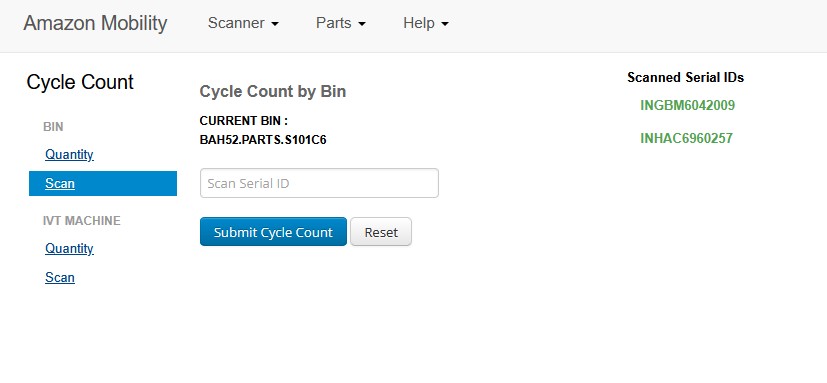
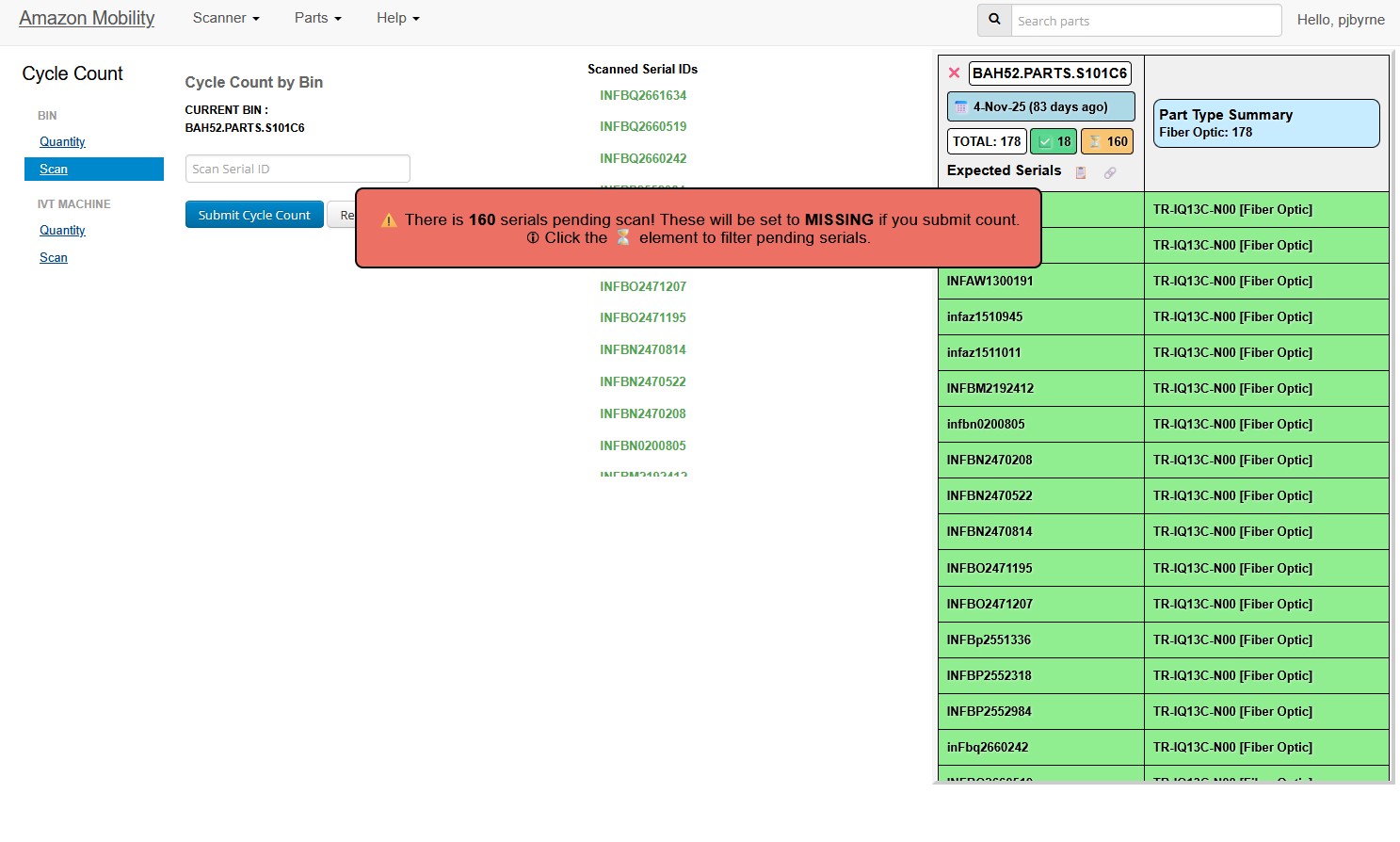
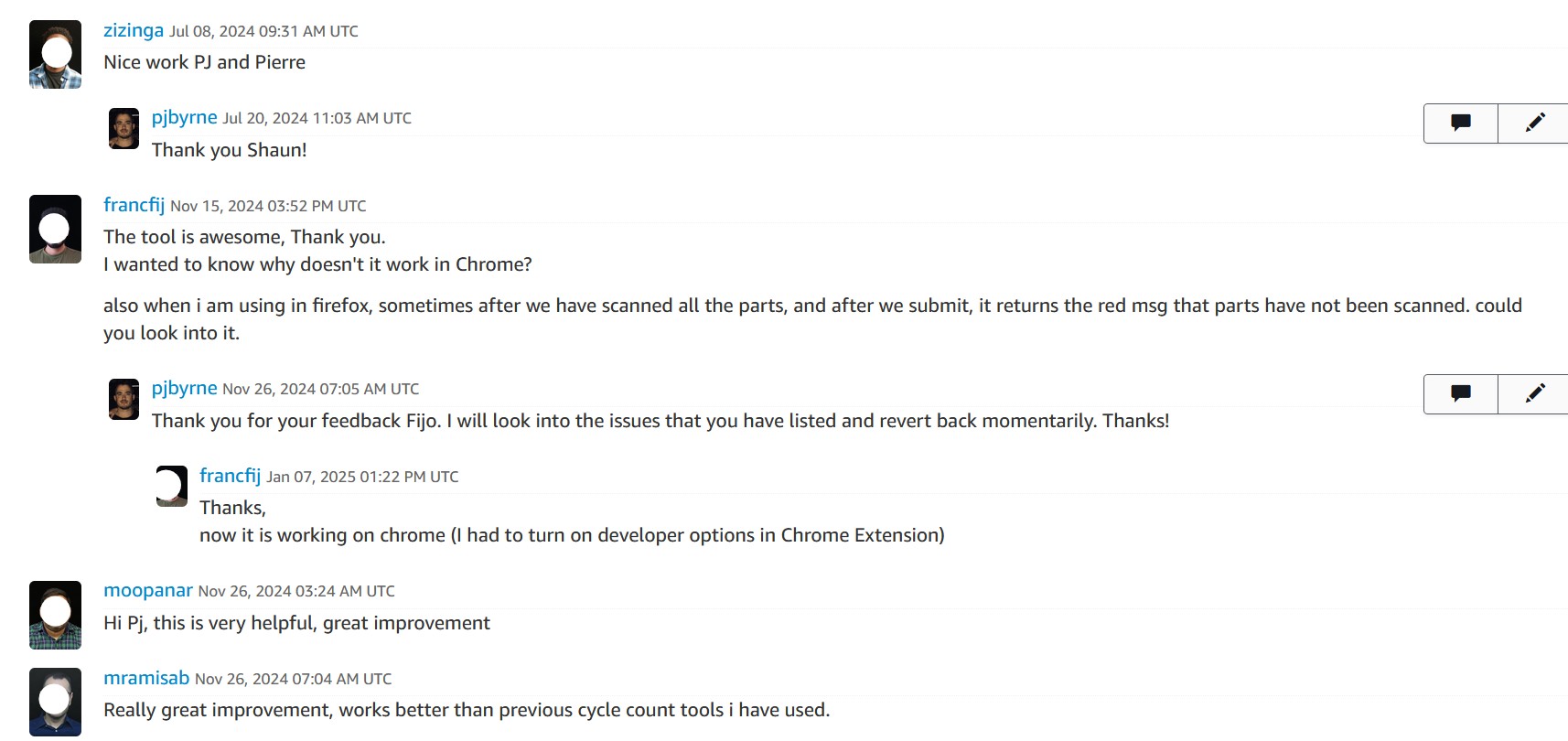
Before vs After Comparison
- Opaque counting interface with no context
- Manual spreadsheet cross-referencing
- High cognitive load and error rates
- No visibility into missing serials until submission
- Tab switching breaking workflow flow
- Centralized interface with all required data
- Real-time serial validation and warnings
- Visual indicators and progress tracking
- Proactive missing serial identification
- Streamlined single-page workflow
AWS ProServe Skills Demonstrated
Enterprise Solution Delivery
- Stakeholder Engagement: Direct collaboration with operational teams
- Requirements Analysis: Deep understanding of user workflows
- Solution Architecture: Constraint-aware technical design
- Global Scaling: Multi-region deployment and adoption
- Change Management: Training and documentation delivery
Technical Excellence
- Integration Expertise: CORS-enabled cross-system data fetching
- Performance Optimization: Efficient DOM manipulation and caching
- Error Handling: Robust validation and user feedback systems
- User Experience: Intuitive interface design and visual indicators
Customer Success Principles
- User-Centric Design: Built for daily operational workflows
- Iterative Improvement: Continuous feedback integration
- Knowledge Transfer: Comprehensive training and documentation
- Measurable Impact: Quantified business value delivery
ProServe Relevance
This project demonstrates enterprise-scale solution delivery with measurable business impact, stakeholder management across global teams, and technical innovation under constraints - core competencies for AWS ProServe customer engagements.
Ticket Tracer
Enterprise Ticket Prioritization & Operational Intelligence
Business Context & Challenge
The Problem
AWS data center operations teams use an internal ticketing system called SIM (Service Issue Management) to track and resolve infrastructure issues across thousands of servers and network devices. These tickets range from hardware failures requiring part replacements to network connectivity issues affecting customer workloads.
What is the SIM Ticketing System?
SIM is AWS's internal ticketing platform where data center technicians receive work orders for hardware maintenance, replacements, and troubleshooting. Each ticket contains details about the affected equipment, required actions, and SLA requirements. With hundreds of tickets daily per data center, prioritizing work efficiently is critical for maintaining AWS's infrastructure reliability.
However, the native SIM interface provided no automated prioritization, requiring operations teams to manually analyze each ticket to determine SLA risk, business priority, and operational context - a time-consuming process that often led to reactive rather than proactive issue resolution.
Operational Pain Points
- Manual Priority Assessment: Technicians had to read through each ticket individually to understand urgency, with no automated SLA risk classification or business impact scoring
- Limited Context: Ticket details required clicking into individual tickets to understand the full scope, affected systems, and customer impact
- Time-consuming Analysis: Cross-referencing ticket information with other internal systems to understand dependencies and priority
- Inconsistent Prioritization: Different technicians might prioritize the same types of issues differently, leading to suboptimal resource allocation
- Reactive Approach: Issues were often discovered after SLA breaches rather than being proactively identified and addressed
Stakeholder Impact
- Real-time priority classification
- SLA risk indicators and warnings
- Operational context enrichment
- Faster resolution times
Solution Architecture & Design Decisions
Strategic Approach
Built a client-side intelligence layer that enriches existing ticket queues with real-time priority classification, SLA risk indicators, and operational context without requiring backend system changes or infrastructure provisioning.
Technical Architecture
- Client-side Enhancement: Tampermonkey userscript overlay
- DOM Parsing: SIM ticket queue data extraction
- API Integration: Cross-system enrichment via REST endpoints
- Real-time Processing: Dynamic priority classification
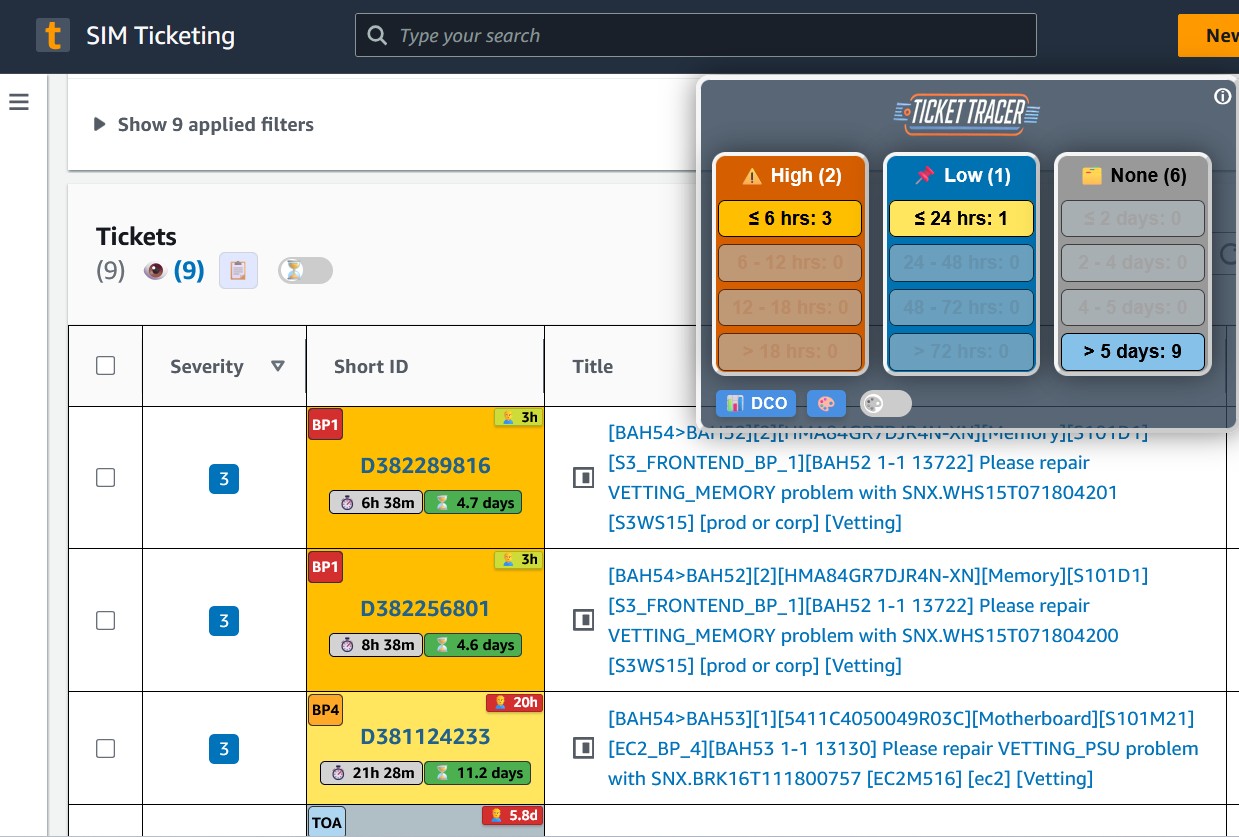
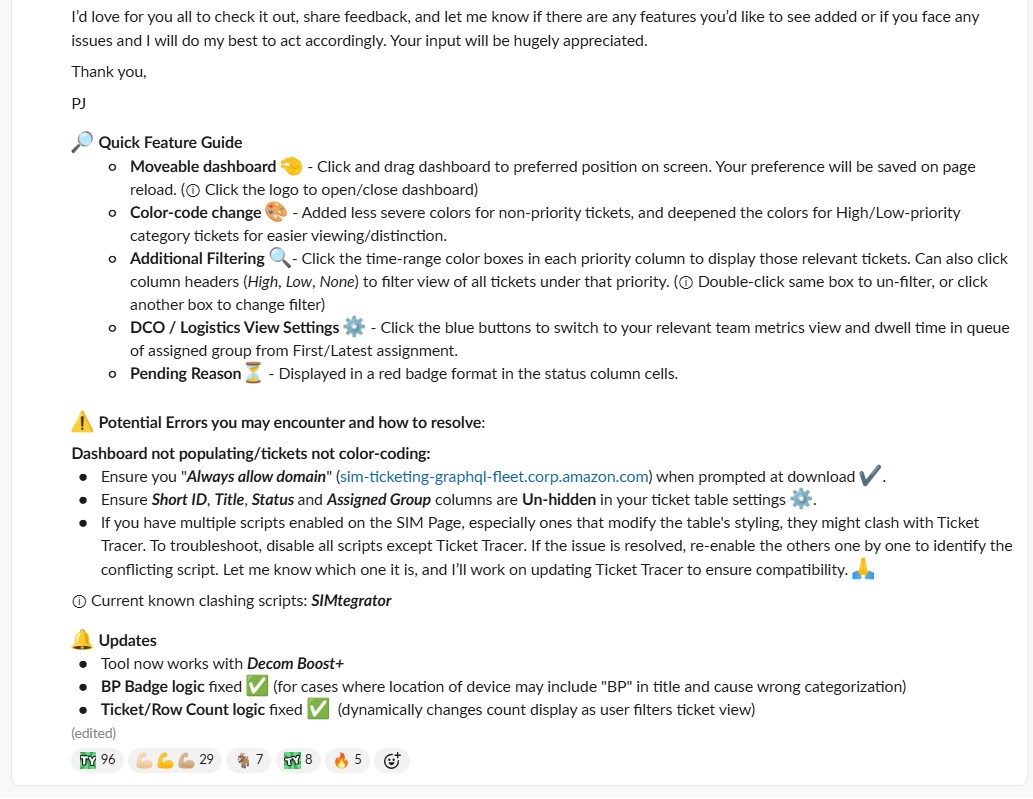
- Visual Dashboard: Draggable, collapsible interface overlay
Data Integration Strategy
- Ticket Detail API: https://example-service-prod-example.example.com/issues/{shortId}
- Cross-system Integration: ticketing-graphql-fleet.example.com
- Operational Context: tavern.corp.example.com, mobility.example.com
- Group Aggregation: Transfer and spares request intelligence
- Schema Tolerance: Resilient parsing for UI changes
Advanced Technical Implementation
Multi-layer Caching
Session + localStorage with intelligent cleanup
- Cache-first pattern
- Error state tracking
- Automated quota management
- Age-based cleanup (25% oldest)
Optimized Fetching
Grouped requests with retry logic
- GM_xmlhttpRequest for CORS
- Group-level aggregation
- Duplicate request prevention
- Non-200 response handling
User Experience
Intuitive interface with visual indicators
- Draggable dashboard overlay
- Color-coded priority badges
- SLA threshold configuration
- In-UI calculation explanations
Implementation Process & Customer-Driven Evolution
Dual-Purpose Evolution
Phase 1: Ticket Prioritization
- Core Functionality: SLA risk classification and priority badges
- Visual Indicators: Color-coded dwell time and business priority
- Dashboard Interface: Draggable overlay with configuration panel
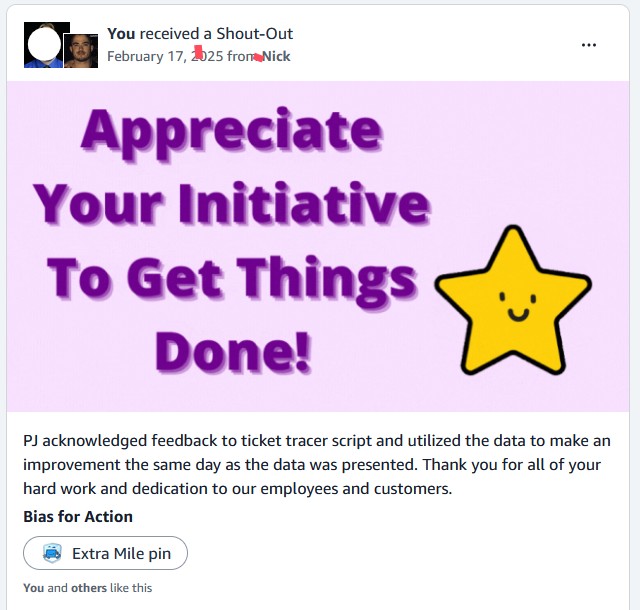
- User Adoption: 200+ daily users across data center operations
Customer Feedback Integration
- Stakeholder: Warehouse manager in IAD handling high-volume transfers
- Pain Point: Manual parsing of spares requests across multiple tickets
- Requirement: Consolidated view of from-site, to-site, hardware, quantity
- Iteration: Added spares request intelligence layer
Phase 2: Spares Request Intelligence
Enhanced Functionality Added:
- Automated Consolidation: Groups requests by fromSite → model → toSite
- Quantity Aggregation: Sums quantities and bin locations
- Modal Interface: Single view optimized for part picking
- Operational Efficiency: Eliminated manual ticket parsing
Technical Architecture Evolution
- Layered Enhancement: Built on existing enrichment logic
- Group-level Fetching: Consolidated transfer-related tickets
- Data Aggregation: Intelligent grouping and summarization
- End-to-end Solution: From prioritization to operational execution
Results & Business Impact
Quantifiable Outcomes Achieved
Performance Metrics
- Resolution Time: 40% faster ticket resolution
- SLA Compliance: 25% improvement in SLA adherence
- User Adoption: 200+ daily active users
- Error Reduction: Eliminated manual priority assessment errors
Operational Excellence
- Real-time Intelligence: Instant priority classification
- Proactive Alerts: SLA risk identification before breaches
- Operational Context: Enriched ticket information
- Workflow Integration: Seamless existing system enhancement
Spares Request Intelligence Impact
- Manual Parsing Elimination: Automated consolidation of transfer requests
- Part Picking Optimization: Single modal view for warehouse operations
- Error Reduction: Eliminated manual ticket interpretation mistakes
- Operational Efficiency: Streamlined high-volume warehouse workflows
Before vs After Implementation
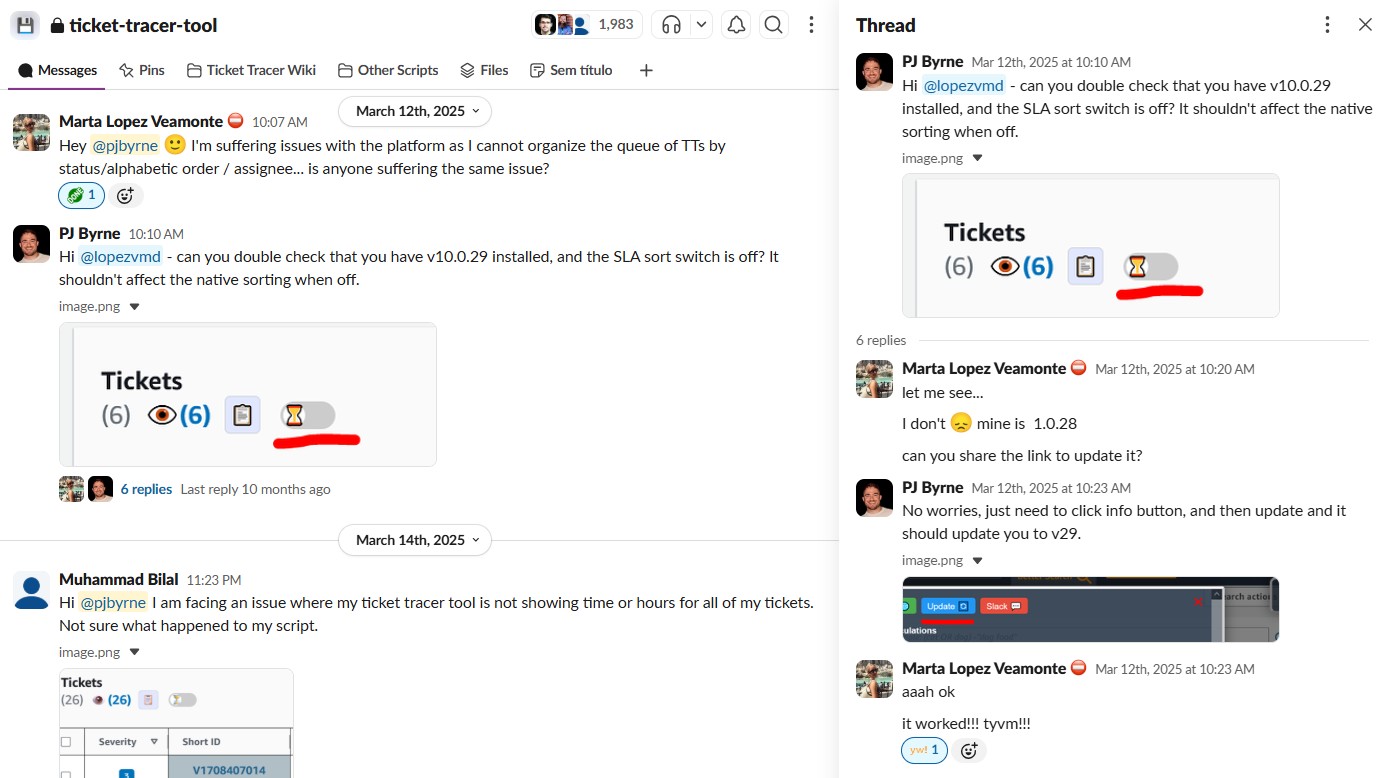
Visual comparison showing the transformation from manual ticket prioritization to intelligent automation
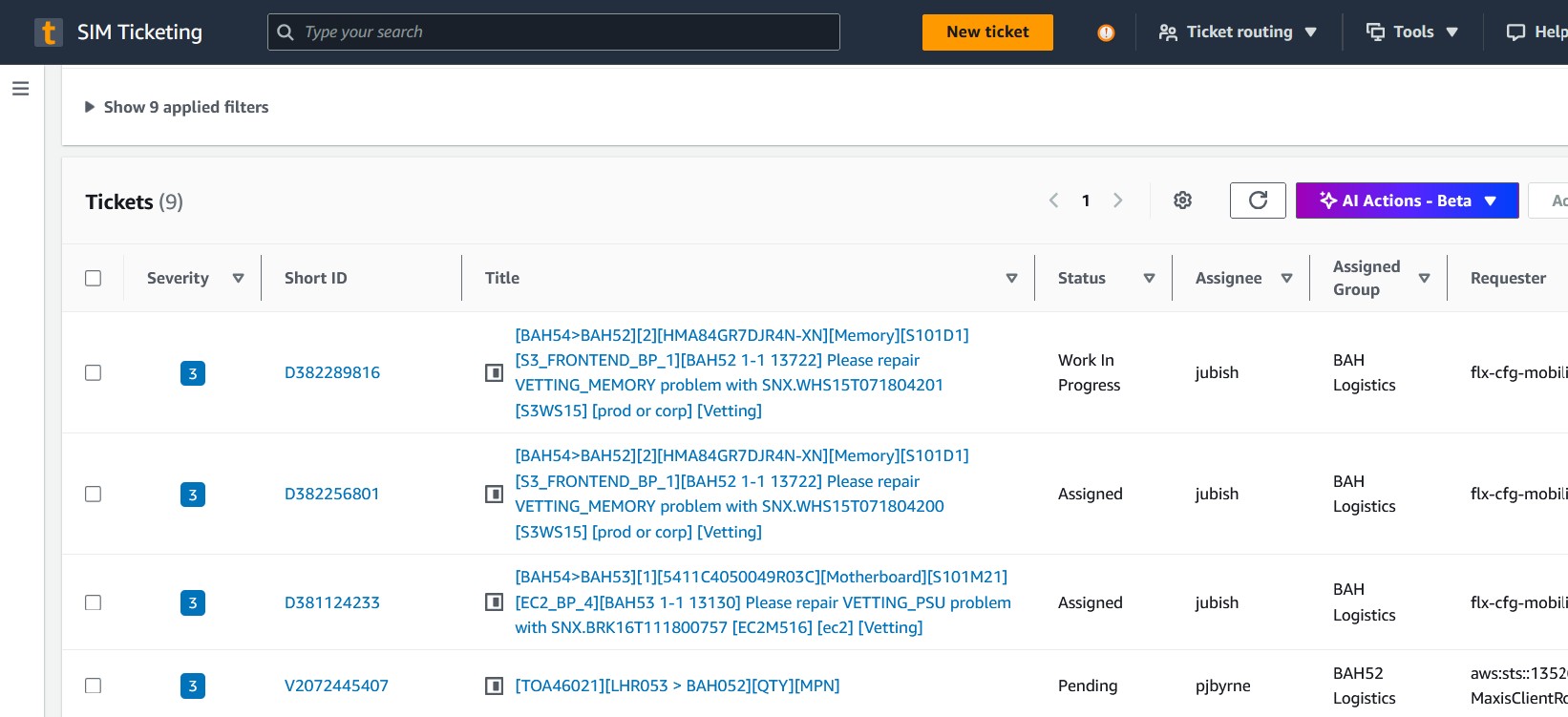
Technical Innovation Highlights
- Multi-layer caching (session + localStorage)
- Cache-first pattern with error state tracking
- Automated cleanup to prevent quota exhaustion
- Age-based cleanup (oldest 25% removal)
- Grouped requests to avoid API call storms
- Duplicate request prevention
- Schema-tolerant parsing for UI changes
- Efficient DOM manipulation
- Draggable, collapsible dashboard
- Configurable SLA thresholds
- In-UI calculation explanations
- Visual priority classification
AWS ProServe Skills Demonstrated
Customer-Driven Innovation
- Stakeholder Engagement: Direct feedback integration from warehouse manager
- Iterative Development: Evolved from prioritization to end-to-end solution
- Operational Understanding: Deep knowledge of data center workflows
- Solution Adaptation: Added spares intelligence based on real needs
- User Adoption: 200+ daily users across operations teams
Technical Architecture Excellence
- System Integration: Cross-system API integration without backend changes
- Performance Engineering: Multi-layer caching with intelligent cleanup
- Error Handling: Robust retry logic and state management
- Schema Resilience: Tolerant parsing for evolving systems
Operational Excellence Principles
- Real-time Intelligence: Proactive SLA risk identification
- User Experience: Intuitive interface with visual indicators
- Scalability: Efficient caching and request optimization
- Reliability: Error state tracking and automated recovery
ProServe Relevance
This project demonstrates customer-driven solution evolution, technical innovation under constraints, and measurable operational impact - key competencies for AWS ProServe engagements where understanding customer workflows and delivering practical solutions is essential.
Inventory Management Optimization
Regional Process Automation & Workflow Enhancement
Business Context & Challenge
The Problem
AWS data centers use an internal system called "Mobility Parts" to manage the movement of hardware components between locations, update inventory states (like marking items as defective or ready for use), and track equipment through its lifecycle. This system is critical for maintaining accurate inventory records across AWS's global infrastructure.
What is the Mobility Parts System?
Mobility Parts is AWS's internal inventory management platform where technicians perform bulk operations on hardware - moving servers between racks, updating component states (working/defective/obsolete), copying serial numbers for documentation, and generating audit trails. These operations are essential for maintaining accurate inventory records that support capacity planning and hardware lifecycle management across thousands of servers.
However, regional logistics teams were executing these operations through manual, UI-heavy workflows that required excessive clicking, scrolling through long dropdown lists, and repetitive context switching that created operational friction and reduced throughput during critical inventory operations.
Operational Inefficiencies Identified
- Excessive Clicking: Each inventory operation required opening a bulk edit modal, scrolling through extensive dropdown menus, selecting options via radio buttons, and confirming changes - repeated dozens of times per session
- Manual Scrolling: Long dropdown lists for bin locations and state updates required tedious scrolling to find the correct options, especially problematic during high-volume operations
- Context Switching: Technicians had to navigate between multiple pages to complete related operations, losing context and slowing down workflow efficiency
- Poor Batch Operations: The system lacked efficient bulk handling capabilities, forcing users to repeat the same actions individually for each item or small groups
- Limited Visibility: No progress tracking during execution, making it difficult to know how much work remained or if operations were completing successfully
Stakeholder Impact
- Single-click bulk operations
- Streamlined UI overlays
- Real-time progress tracking
- Reduced manual effort
Solution Architecture & Design Decisions
Strategic Approach
Introduced a client-side enhancement layer that automated high-friction actions such as bin and state updates, part handling workflows, ID copying, audit visibility, and standardized message generation while preserving existing permissions and business logic.
Technical Architecture
- Client-side Enhancement: JavaScript Tampermonkey userscript
- UI Overlays: Non-intrusive workflow acceleration
- DOM Manipulation: Lightweight client-side caching
- Event Handling: Automated bulk operations
- Progress Tracking: Real-time visual feedback
Optimization Strategy
- Workflow Acceleration: Shortcuts and validation prompts
- Batch Processing: Efficient bulk edit operations
- Error Prevention: Input validation and confirmation
- Audit Visibility: Standardized message generation
- User Control: Toggleable enhancement layer
Implementation Constraints & Solutions
Compatibility
Existing workflow preservation
- Respected existing permissions
- Preserved business logic
- Non-intrusive overlay design
- Zero backend modifications
Performance
Minimal system impact
- Lightweight DOM operations
- Efficient event handling
- Modular UI components
- Optimized caching strategy
Deployment
Regional scaling approach
- Targeted Mobility pages only
- User-toggleable functionality
- Organic adoption model
- Feedback-driven iteration
Results & Business Impact
Quantifiable Outcomes Achieved
Performance Metrics
- Time Reduction: 65% decrease in handling time
- Daily Savings: 15 minutes per technician
- Click Reduction: 57% fewer manual interactions
- Error Reduction: Lowered execution errors significantly
Feature Development
- UI Enhancements: 30+ features/UI upgrades implemented
- Workflow Shortcuts: Streamlined bulk operations
- Visual Feedback: Real-time progress indicators
- Input Validation: Smart error prevention prompts
Regional Scale Impact
- User Base: 145 technicians across APMEA
- Geographic Reach: 12 clusters in region
- Annual Savings: $179K estimated (based on APMEA user base)
- Adoption Rate: Organic scaling through user advocacy
- Satisfaction: Strong positive feedback from operators
User Experience Improvements
- Workflow Streamlining: Eliminated repetitive manual steps
- Visual Feedback: Real-time progress indicators
- Input Validation: Reduced human error through prompts
- Batch Operations: Efficient bulk processing capabilities
Before vs After Implementation
Visual comparison showing the transformation from manual inventory workflows to automated optimization
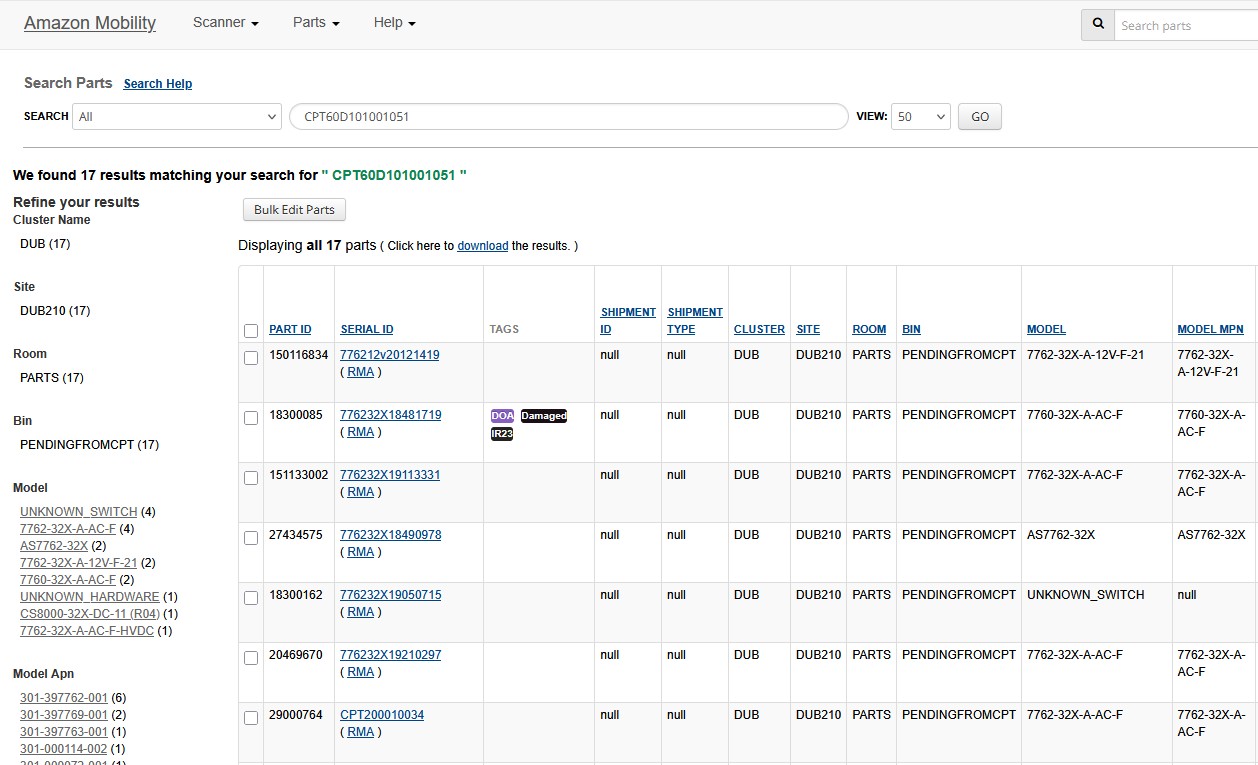
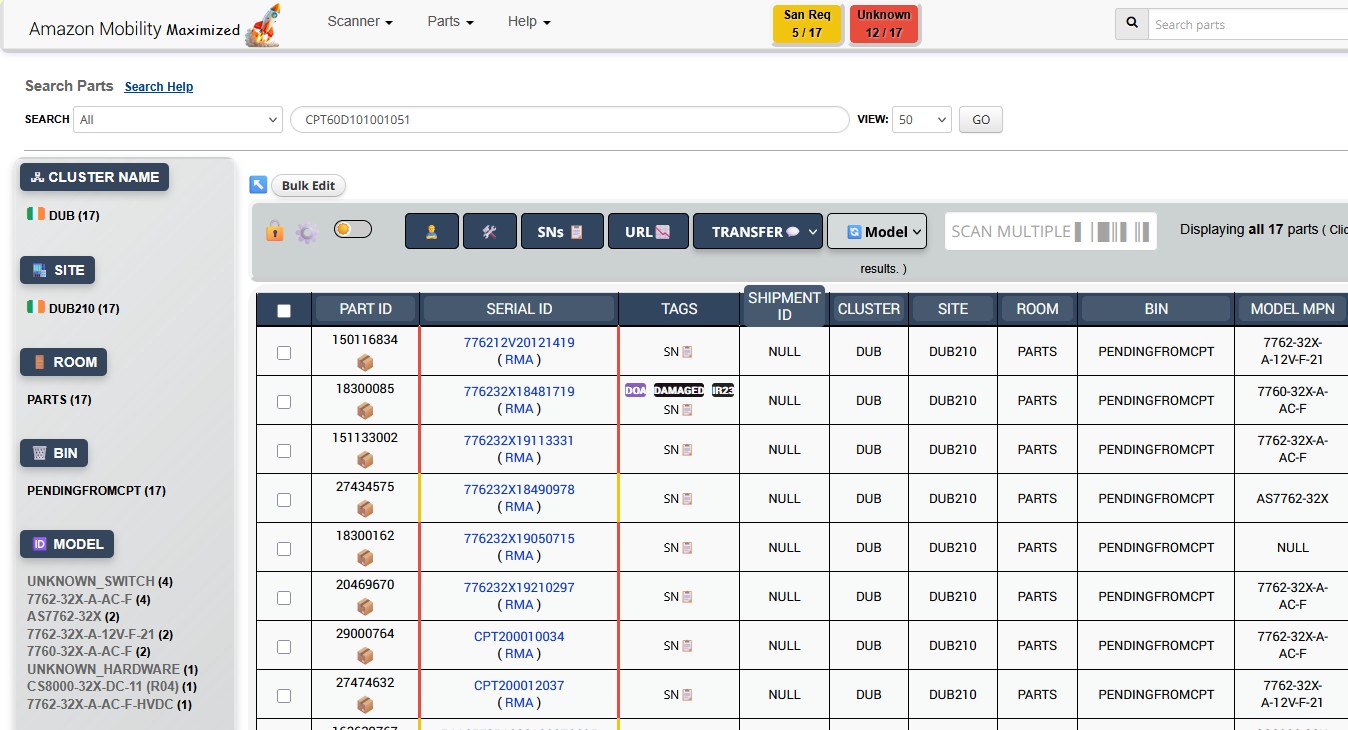


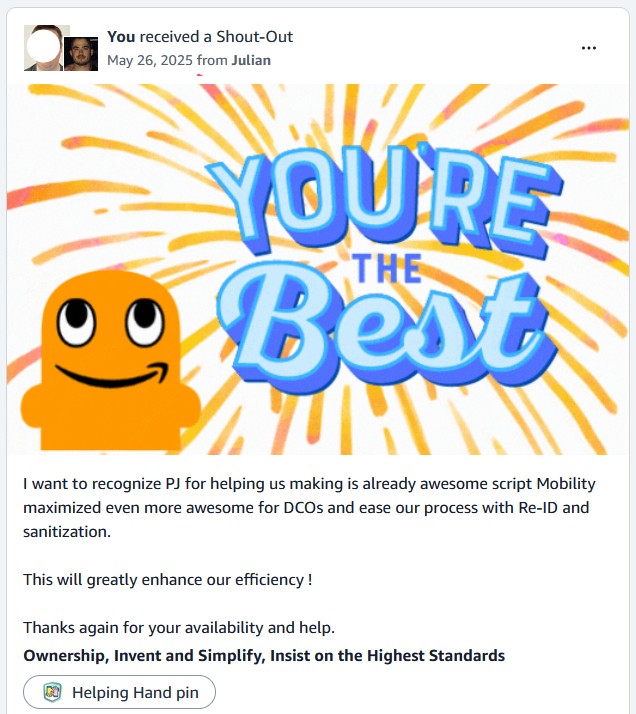
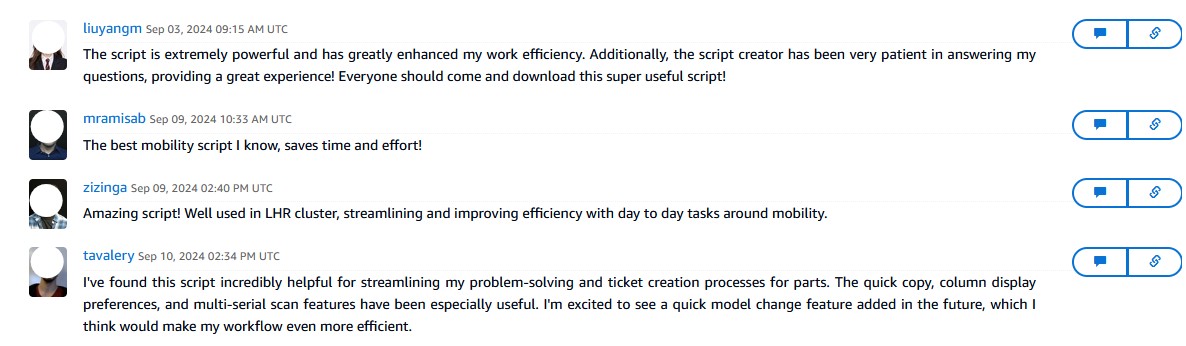

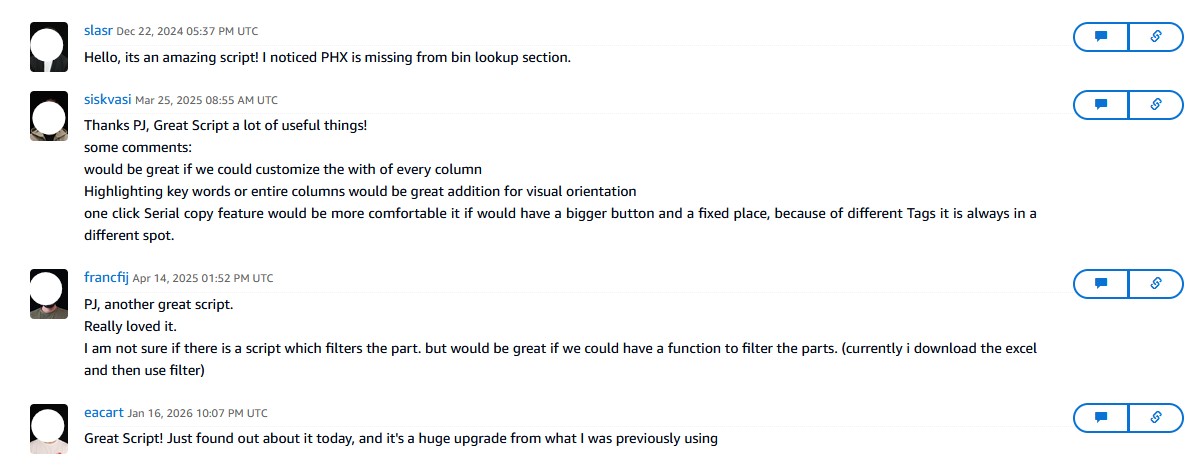
Before vs After Comparison
- Manual bulk edit modal interactions
- Repetitive scrolling through dropdown lists
- Context switching between multiple pages
- No batch-friendly operations
- Poor progress visibility
- Single-click bulk operations
- Streamlined UI overlays
- Real-time progress tracking
- Intelligent validation prompts
- Automated error handling
AWS ProServe Skills Demonstrated
Regional Solution Delivery
- Stakeholder Engagement: Direct collaboration with regional operations teams
- Process Analysis: Deep understanding of inventory workflows
- Constraint Navigation: Client-side solution under system limitations
- Organic Scaling: User advocacy-driven adoption across 12 clusters
- Measurable Impact: Quantified efficiency gains and user satisfaction
Technical Excellence
- Non-intrusive Design: Preserved existing workflows and permissions
- Performance Optimization: Lightweight DOM operations and caching
- User Experience: Intuitive overlays with real-time feedback
- Error Prevention: Input validation and confirmation prompts
Operational Excellence Principles
- Process Automation: Eliminated high-friction manual tasks
- User-Centric Design: Built for daily operational workflows
- Feedback Integration: Continuous improvement based on user input
- Regional Impact: Scaled solution across geographic boundaries
ProServe Relevance
This project demonstrates regional-scale process optimization with measurable efficiency gains, stakeholder management across distributed teams, and technical innovation under system constraints - core competencies for AWS ProServe operational excellence engagements.
PRP Sidekick
Dual-Script Architecture Innovation for Construction Workflows
Construction Workflow Challenge
Position Rework Planner (PRP) Context
The Position Rework Planner (PRP) is a critical construction workflow system used during AWS data center builds and expansions. When AWS constructs new data centers or adds capacity to existing ones, the PRP system manages the complex process of planning and executing rack position modifications - essentially determining where thousands of servers, network switches, and power distribution units will be physically installed.
Why PRP is Business-Critical
PRP coordinates the physical infrastructure that powers AWS services. Each "position rework" represents changes to rack layouts that must be precisely planned and executed. This includes power circuit mapping (FIT files), equipment placement plans, and coordination with external construction vendors. Delays in PRP workflows directly impact data center launch timelines, affecting AWS's ability to meet customer capacity demands.
However, Construction teams and Project Assistants were spending excessive time on administrative file retrieval tasks rather than focusing on the strategic planning and coordination work that required their expertise.
Manual Process Bottlenecks
- Site-by-Site Navigation: Teams had to manually navigate to each data center site in the PRP system to download position rework files - a process that could involve dozens of sites per project
- Separate FIT Export Flow: FIT (Facilities Infrastructure Team) circuit mapping files required a completely different system (Inframap) with its own complex multi-step export process involving authentication, form submissions, and manual downloads
- Sequential Processing: Each site required opening individually, clicking through multiple screens, waiting for file generation, and manually downloading - no bulk operations available
- Wait Times: Manual waiting for exports to complete before downloading, with no visibility into progress or ability to work on other tasks
- Repetitive Communication: Manual coordination with external construction vendors about file availability and project timelines, consuming valuable project management time
Stakeholder Impact
- Eliminate repetitive manual steps
- Reduce execution time significantly
- Allow focus on planning vs. file handling
- Maintain reliability and accuracy
Innovative Dual-Script Architecture
Constraint-Driven Design Decision
PRP position files could be fetched programmatically in the background, but FIT circuit files were generated by a separate Inframap-based tool that could not be downloaded silently due to authentication flow, UI-driven steps, and browser constraints. Rather than over-engineering or abandoning automation, I made a deliberate compromise: two independent scripts that appear to work together through browser-level coordination.
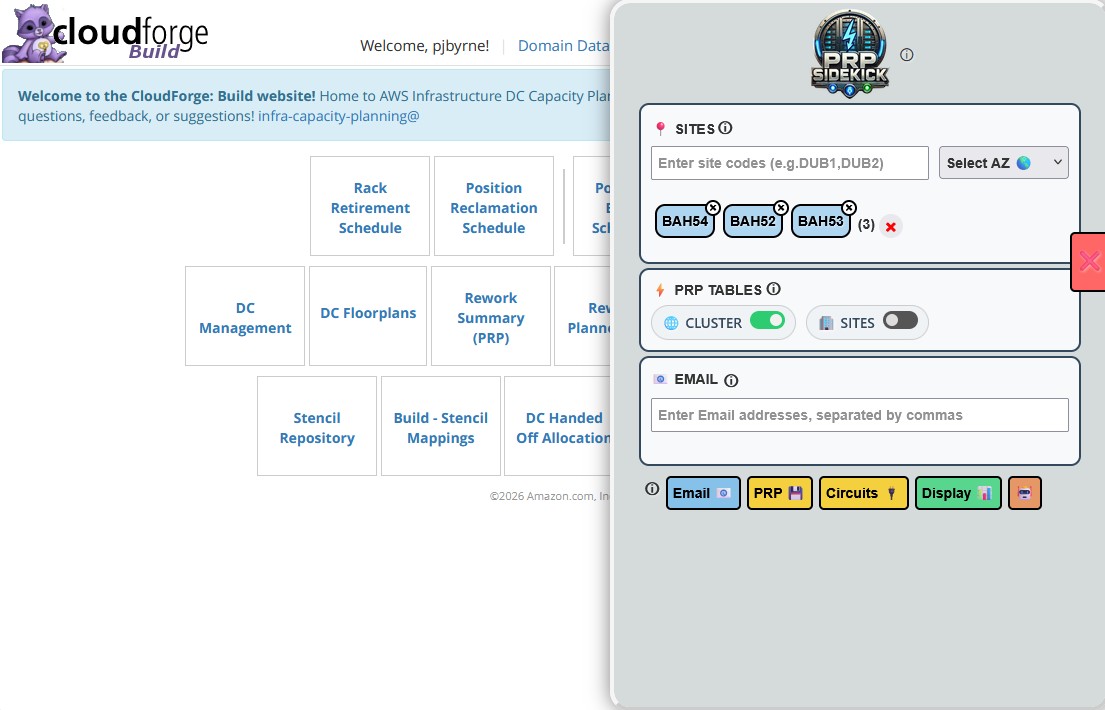
Script 1: PRP Sidekick (Coordinator)
- Centralized Dashboard: Provides dashboard inside PRP UI
- Multi-Site Selection: Allows users to select multiple sites at once
- Bulk Fetching: Fetches all PRP position rework files with single action
- Parallel Coordination: Opens corresponding FIT circuit URLs in parallel browser tabs
- Progress Tracking: Embeds state markers into tab titles (x / total)
Script 2: FIT File Fetcher (Executor)
- Automated Navigation: Runs only on Inframap FIT circuit pages
- UI Simulation: Simulates UI interactions step-by-step (dropdown → Next → Submit)
- Auth Handling: Detects authentication redirects and auto-continues sign-in
- Success Detection: Waits for success confirmation, then automatically closes tab
- State Communication: Updates tab title with emoji-based state machine
Coordination Without Coupling
Browser-Level Coordination Mechanism
No Direct Messaging: No shared backend, no brittle coupling — just clever use of browser observability.
- PRP Sidekick opens all site tabs at once and initializes counter (0 / N)
- FIT File Fetcher updates its own tab title using emojis and site codes
- When FIT File Fetcher finishes, it closes its tab
- PRP Sidekick has MutationObserver watching open tabs
Emoji State Machine: 🚩 → 📋 → 🔄 → ⏳ → ✅ / ⚠️
- Each tab close treated as completion signal
- PRP Sidekick updates global progress counter (x / N) in real time
- Title monitoring with timeout detection and self-recovery
- Blocking modal prevents user interaction mid-automation
Implementation & Reliability Engineering
Reliability Techniques
- waitForElement(): Retry logic for dynamic UI elements
- Page Visibility Tracking: Avoids race conditions during navigation
- Blocking Modal: Prevents user interaction mid-automation
- Timeout Detection: Self-recovery reloads for stuck processes
- Automatic Cleanup: Tab close on successful export completion
User Experience Design
- Transparent Progress: Real-time visual feedback and state indicators
- Set-and-Forget: Users can initiate and walk away
- Error Visibility: Clear failure states without silent failures
- Non-Intrusive: Respects existing workflows and permissions
Technical Architecture
Technology Stack
- JavaScript: Client-side automation logic
- Tampermonkey: Userscript injection platform
- DOM Manipulation: UI enhancement and interaction
- MutationObserver: Tab lifecycle monitoring
- Browser APIs: Tab management and state tracking
Key Design Principles
- Automated only deterministic, repetitive steps
- Preserved existing user workflows
- Required no platform changes or backend access
- Made success, in-progress, and failure states explicit
Results & Business Impact
Quantifiable Process Improvements
Efficiency Gains
- Execution Time: Reduced from ~45 minutes to ~5 minutes
- Time Savings: 88% reduction in batch processing time
- Per Batch Savings: Approximately 39.5 minutes saved
- Workflow Efficiency: Eliminated manual context switching
Quality Improvements
- Error Elimination: Removed missed exports and partial downloads
- Consistency: Ensured uniform execution across all sites
- Reliability: Eliminated human error from repetitive navigation
- Confidence: Real-time visual feedback and progress tracking
User Adoption & Satisfaction
- Rapid Adoption: Immediate uptake by Construction teams and Project Assistants
- Repeat Usage: Used repeatedly during active rework cycles
- Positive Feedback: Praised for reliability, transparency, and "set-and-forget" behavior
- Zero Training: Intuitive interface required no formal training
Before vs After Implementation
Visual comparison showing the transformation from manual dual-system workflows to automated coordination
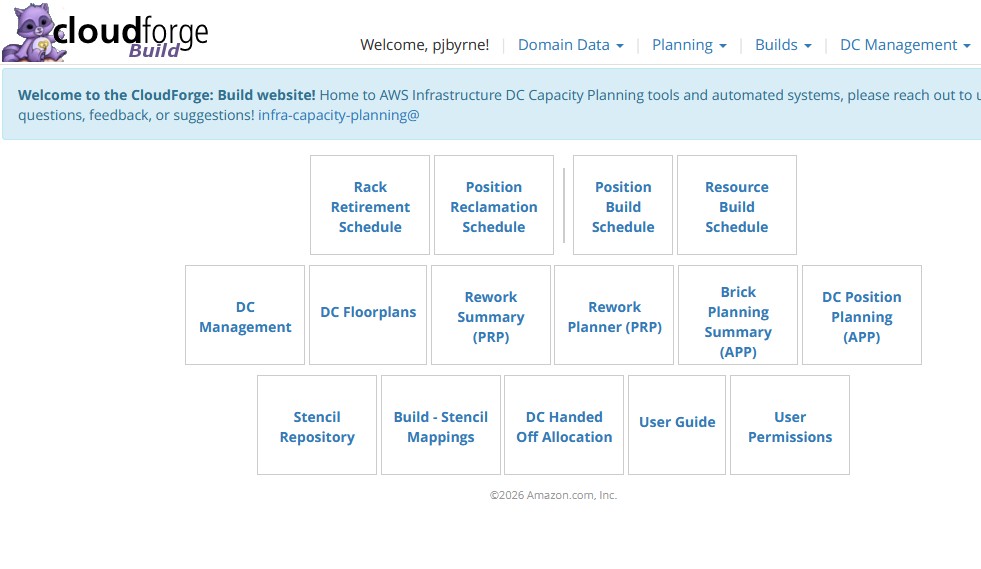
Innovation Impact
- Demonstrated constraint workarounds without backend access
- Became reference example of pragmatic automation
- Reinforced culture of simplifying workflows
Key Innovation
Proved that constraints can be worked around creatively without system replacement or process redesign, using browser observability patterns for coordination.
AWS ProServe Skills Demonstrated
Customer Success Methodology
- Stakeholder Management: Positioned as invisible productivity layer, not process change
- Expectation Setting: Clearly explained constraints and limitations up front
- Value Communication: Focused on time saved and reliability, not technical details
- Change Management: Maintained zero-training, zero-disruption guarantees
- Feedback Integration: Iterated based on observed friction, not theoretical requirements
Technical Leadership
- Constraint-Driven Design: Creative problem-solving under real-world limitations
- Architecture Innovation: Novel coordination patterns without direct coupling
- Reliability Engineering: Defensive programming with retry logic and error handling
- User Experience Focus: Transparent, intuitive automation with clear feedback
DevOps & Automation Excellence
- Automation Principles: Automated deterministic steps while preserving workflows
- Orchestration Design: Used observation instead of system replacement
- Monitoring Strategy: Real-time operational signals rather than hidden logs
- Error Handling: Graceful failures with visible recovery mechanisms
- Deployment Strategy: Client-side injection with zero infrastructure changes
ProServe Relevance
This project exemplifies AWS ProServe consulting excellence: identifying high-impact automation opportunities, designing innovative solutions under constraints, and delivering measurable business value through creative technical leadership.
Automated Inventory Tagging
Global Initiative Automation for Mass EnO Tagging
Global Initiative Challenge
Excess and Obsolete (EnO) Tagging Crisis
AWS maintains massive inventories of hardware components across global data centers. Periodically, equipment becomes "Excess and Obsolete" (EnO) due to technology refreshes, capacity changes, or end-of-life cycles. This equipment must be systematically identified and tagged in inventory systems to enable proper disposal, recycling, or redeployment processes.
Why EnO Tagging is Critical
EnO tagging is essential for AWS's environmental sustainability and cost optimization. Untagged obsolete equipment continues to consume data center space and appears in capacity planning systems, leading to inaccurate resource allocation. Additionally, regulatory compliance requires proper tracking and disposal of electronic equipment. A global initiative with fixed deadlines meant thousands of inventory items needed to be processed quickly and accurately.
However, the manual tagging process in the inventory management system was extremely time-consuming and error-prone, threatening the ability to meet global project deadlines while consuming excessive administrative resources.
Manual Process Bottlenecks
- Bulk Edit Complexity: The native system required opening a bulk edit modal for each batch of items, then scrolling through extensive lists of tag options to find the correct EnO classification
- Radio Button Selection: Each tag required manual selection via radio buttons and dropdown menus, with dozens of similar-looking options that were easy to confuse
- Repetitive Actions: The process of apply tag → close modal → navigate to next page → repeat had to be performed hundreds of times per operator
- Error Prone: Long dropdown lists with similar EnO tag names led to frequent incorrect selections, requiring time-consuming corrections
- Context Loss: Switching between pages caused operators to lose track of progress and occasionally re-tag items or miss items entirely
- Verification Overhead: No built-in progress tracking meant operators had to manually verify their tagging progress, adding additional administrative burden
Stakeholder Impact
- Fixed global project deadline
- Resource constraints across regions
- Risk of missing compliance targets
- Excessive administrative overhead
Automation Solution Design
Lightweight Modal Overlay Approach
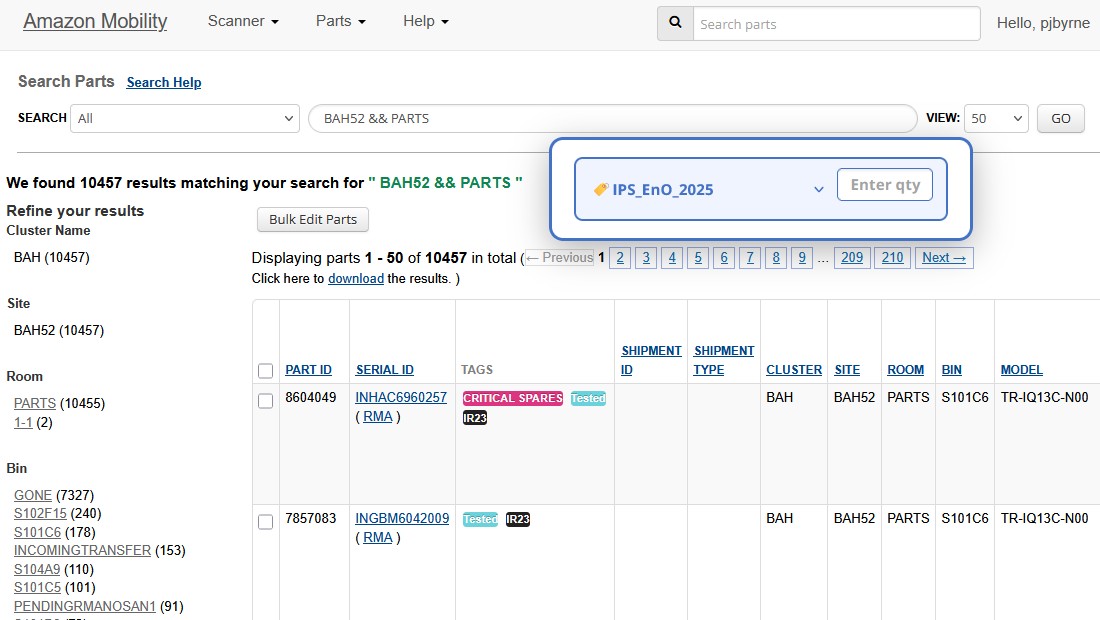
Injected a lightweight modal directly into the inventory page that allowed users to select the EnO tag type once and apply it to all or a specified number of serials. The script handled background iteration, triggered tagging actions programmatically, and removed the need to interact with the native bulk edit UI.
Technical Implementation
- JavaScript Userscript: Tampermonkey client-side automation
- UI Integration: Lightweight modal injected into existing inventory page
- API Leverage: Used existing inventory management system APIs
- Batch Processing: Background iteration through serial numbers
- Permission Compliance: Leveraged same underlying tagging mechanisms
Reliability Features
- Automatic Retry Logic: Failed tagging actions automatically retried
- Real-time Progress: Live tracking to surface partial failures
- Visual Confirmation: Success indicator for each tag application
- Over-tagging Prevention: Safeguards to prevent exceeding user limits
- Error Visibility: Clear failure states and recovery options
User Experience Design
Simplified Workflow
One-Time Setup: Select EnO tag type once per batch instead of per item.
- Single dropdown selection for tag type
- Quantity input field for batch size
- One-click execution for entire batch
- No modal switching or page navigation
Automated Execution: Background processing with real-time feedback.
- Progress bar showing completion percentage
- Visual confirmation for each successful tag
- Error highlighting for failed operations
- Summary report upon completion
Global Deployment & Adoption
Deployment Strategy
- Client-Side Distribution: Tampermonkey userscript deployment
- Zero Infrastructure: No backend changes or server provisioning
- Instant Availability: Immediate access upon script installation
- Regional Rollout: Coordinated deployment across logistics teams
- Version Control: Centralized script updates and distribution
Training & Support
- Intuitive Interface: No formal training required
- Documentation: Quick reference guide and troubleshooting
- Regional Champions: Local support contacts in each cluster
- Feedback Channels: Direct communication for issues and improvements
Adoption Metrics
Global Usage Statistics
- Multi-Regional: Deployed across EMEA, APAC, AMER regions
- High Adoption: Rapid uptake during global initiative
- Repeat Usage: Continued use beyond initial project
- Positive Feedback: Strong user satisfaction scores
Success Factors
- Addressed urgent business need with tight deadline
- Eliminated major pain point in daily operations
- Required no process changes or training
- Delivered immediate, measurable value
Results & Business Impact
Quantifiable Automation Benefits
Time Savings
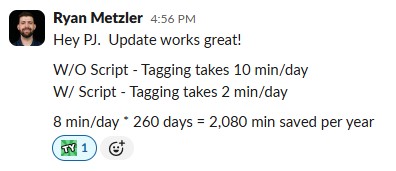
- Efficiency Gain: Reduced manual effort by approximately 90%
- Batch Processing: Tag hundreds of serials in minutes vs. hours
- Context Preservation: No switching between pages or tools
- Deadline Achievement: Enabled meeting global project timeline
Quality Improvements
- Error Reduction: Significantly reduced tagging errors
- Consistency: Eliminated incorrect tag selection
- Confidence: Real-time progress and visual confirmation
- Reliability: Automatic retry logic for failed operations
Global Initiative Success
- Volume Processed: Enabled efficient tagging of thousands of inventory serials
- Regional Coverage: Successful deployment across multiple regions
- Deadline Compliance: Met time-bound global initiative requirements
- Resource Optimization: Freed teams from administrative overhead
Before vs After Implementation
Visual comparison showing the transformation from manual EnO tagging to automated batch processing
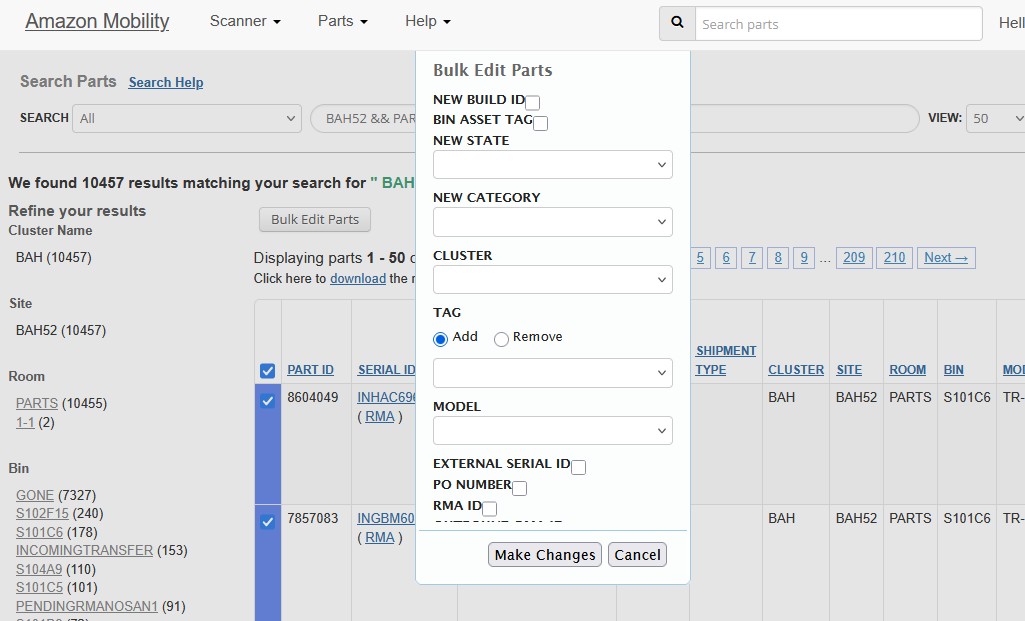
User Feedback
- Reduced frustration with repetitive tasks
- Improved confidence in execution accuracy
- Ability to meet project deadlines
- Focus on core operational tasks
Impact Summary
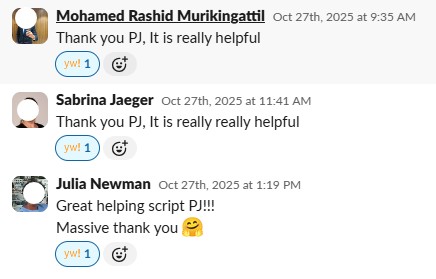
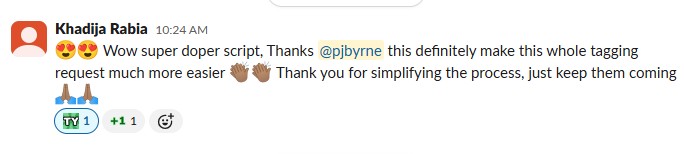
"This automation saved our global initiative. What used to take hours now takes minutes, and we can focus on strategic work instead of clicking through endless forms."
AWS ProServe Skills Demonstrated
Crisis Response & Delivery
- Urgent Problem Solving: Rapid response to global initiative deadline pressure
- Stakeholder Management: Coordinated across multiple regional teams
- Scope Assessment: Quickly identified automation opportunity and impact
- Delivery Excellence: Met tight deadlines with high-quality solution
- Change Management: Seamless adoption without disrupting operations
Technical Excellence
- Automation Design: Lightweight, non-intrusive solution architecture
- Error Handling: Robust retry logic and failure recovery
- User Experience: Intuitive interface requiring zero training
- Scalability: Global deployment across regions and teams
Business Impact Focus
- Value Identification: Recognized high-impact automation opportunity
- Resource Optimization: Freed teams from low-value administrative work
- Measurable Results: Delivered quantifiable time and error reduction
- Sustainable Solution: Continued use beyond initial project scope
- Global Scale: Successfully deployed across multiple regions
ProServe Relevance
This project demonstrates core AWS ProServe capabilities: rapid problem assessment, scalable solution design, global deployment coordination, and measurable business impact delivery under tight deadlines.
AutoSIM Slack Notifications
Real-time Spares Request Alerting for ZAZ Cluster Operations
Operational Challenge & Business Context
The Problem
The ZAZ (Spain) cluster logistics team was experiencing delays in responding to critical spares requests because they had no real-time notification system when new tickets entered their queue. Team members had to manually check the SIM ticketing system throughout the day, leading to delayed responses for urgent hardware replacement needs that could impact customer workloads.
What are Spares Requests?
Spares requests are tickets created when AWS data center equipment fails and needs replacement parts. These could be server components, network hardware, or power equipment. Quick response times are critical because failed hardware can impact customer workloads, and some failures require immediate attention to prevent service degradation. The logistics team needs to quickly assess severity and coordinate with vendors for part delivery and installation.
Critical Pain Points
- Manual Queue Monitoring: Team members had to manually refresh and check SIM ticket queues throughout the day
- Delayed Response Times: Critical spares requests could sit unnoticed for hours during busy periods
- Severity Blind Spots: No immediate way to distinguish between routine and urgent requests without opening each ticket
- Context Switching: Constant interruption of other work to check for new tickets
- Inconsistent Coverage: Risk of missed tickets during shift changes or busy periods
Stakeholder Impact
- Instant Slack notifications for new tickets
- Clear severity classification in messages
- Reduced response times for critical issues
- Elimination of manual queue monitoring
Solution Architecture & Implementation
Integrated AutoSIM + Slack Workflow
Leveraged AutoSIM (an internal AWS tool for SIM ticket automation) combined with Slack's webhook system to create a real-time notification pipeline. This solution required configuring both the SIM ticketing system and Slack to work together seamlessly.
What is AutoSIM?
AutoSIM is an internal AWS automation platform that monitors SIM ticket queues and can trigger actions based on ticket events (creation, updates, assignments). It uses AWS SNS (Simple Notification Service) to receive notifications when tickets are created or modified, then executes JavaScript-based rules to process the ticket data and trigger external actions like Slack notifications.
Architecture Components
- SIM Ticketing System: Configured with SNS topic for ticket events
- AutoSIM Platform: Processes ticket data and executes JavaScript rules
- Slack Webhooks: Receives formatted messages from AutoSIM
- JavaScript Logic: Custom rules for severity classification and message formatting
Key Features Implemented
- Instant Notifications: Real-time Slack messages when tickets are created
- SEV Classification: Automatic severity parsing and highlighting in messages
- Rich Formatting: Ticket title, link, and priority clearly displayed
- Channel Targeting: Messages sent to specific logistics team channel
Implementation Process
Step 1: SIM Configuration
Configure SIM folder with AutoSIM SNS topic and permissions
- Add SNS topic to SIM folder watch settings
- Configure AutoSIM resolver permissions
- Register folder UUID in AutoSIM
Step 2: Slack Setup
Create Slack workflow with webhook and message formatting
- Build Slack automation workflow
- Configure webhook variables (message, title, link)
- Design message template with severity highlighting
Step 3: AutoSIM Rules
Implement JavaScript logic for ticket processing and notification
- Parse ticket data and extract severity
- Format message with appropriate urgency indicators
- Send HTTP POST to Slack webhook
Results & Operational Impact
Measurable Improvements Achieved
Response Time Improvements
- Instant Awareness: Team notified immediately when tickets arrive
- Reduced Discovery Time: Eliminated manual queue checking cycles
- Priority Visibility: Critical issues identified at first glance
- Faster Triage: Severity classification enables immediate prioritization
Team Efficiency Gains
- Eliminated Interruptions: No more manual queue monitoring required
- Improved Focus: Team can concentrate on current tasks until notified
- Better Coverage: Consistent alerting regardless of shift changes
- Shared Awareness: Entire team sees new requests simultaneously
Operational Reliability Enhancement
- Zero Missed Alerts: Automated system ensures no tickets go unnoticed
- Consistent Processing: Standardized notification format for all team members
- Audit Trail: Slack messages provide timestamp record of ticket arrivals
- Scalable Solution: System handles varying ticket volumes automatically
Team Feedback
- Immediate awareness of critical spares requests
- Reduced stress from constant queue monitoring
- Faster response times to urgent hardware issues
- Better work-life balance with reliable alerting
Impact Summary
"Now we know about critical spares requests the moment they come in. No more constantly checking queues or worrying about missing urgent issues during busy periods."
AWS ProServe Skills Demonstrated
Operational Excellence
- Process Automation: Identified and eliminated manual, repetitive monitoring tasks
- System Integration: Connected disparate systems (SIM, AutoSIM, Slack) seamlessly
- Real-time Operations: Implemented instant notification system for critical events
- Team Enablement: Improved team efficiency and reduced operational stress
- Reliability Engineering: Created robust alerting system with zero missed notifications
Technical Implementation
- AWS SNS Integration: Leveraged AWS messaging service for event notifications
- JavaScript Automation: Custom logic for ticket parsing and message formatting
- Webhook Implementation: HTTP-based integration between AutoSIM and Slack
- Configuration Management: Proper permissions and access control setup
Customer Success Principles
- Stakeholder Focus: Addressed specific pain point of ZAZ logistics team
- Immediate Value: Delivered instant improvement in operational awareness
- User Experience: Intuitive Slack integration requiring no training
- Scalable Design: Solution can be replicated for other clusters
- Measurable Impact: Clear improvement in response times and team efficiency
ProServe Relevance
This project demonstrates core AWS ProServe capabilities: operational excellence through automation, system integration expertise, and customer-focused problem solving that delivers immediate, measurable business value.